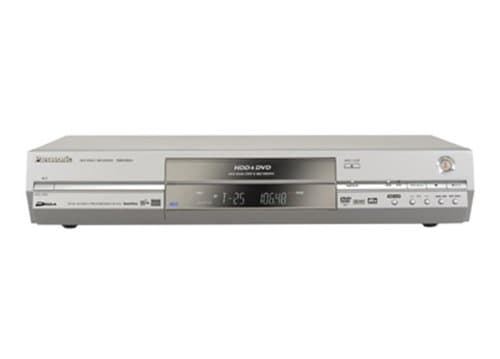
Panasonic DMR-E85
Ease of Use
Features
Image Quality
Panasonic DMR-E85
When you purchase through links on our site, we may earn an affiliate commission. Here's how it works.
User Reviews
Value For Money
Image Quality
Sound Quality
Features
Ease of Use
Shame Panasonic For Not Being Empathtic And Not Co
Shame Panasonic for not being empathtic and not covering warranty because it was 2 months after warranty expiration. It's ok, i work in a call centre and make sure i give negative Panasonic feedback. Approx once a week now. But earlier, whoa 10 times a day.
Value For Money
Image Quality
Sound Quality
Features
Ease of Use
I Decided To Buy A Dvd Recorder A Couple Of Months
I decided to buy a DVD Recorder a couple of months ago because I wanted to be able to convert my VHS Tapes, and the tapes I have from the Hi8 HandyCam, into a digital format which I could then record to DVD. Since the VHS tapes are larger, and more cumbersome, and since they don't last as long as CD's or DVD's, I definitely wanted to get the media moved from one format to another before there was any sort of permanent degradation to my tapes. And, so I would have more room on the walls of my house. So, I began scouring the Internet for information about DVD drives and recorders. I visited nearly 100 websites all over the world, including the 'biggies', like PriceScan, BestBuy, Overstock, Pricegrabber, BizRate, ePinions, etc What I realized in visiting these sites and reading all of the product spec's and reviews was this; If you decide to get a DVD Recorder, it is IMPERATIVE that you get one that has a functioning Hard Disk Drive. I say this for a number of reasons.
One: A functioning hard drive acts as a buffer between the DVD drive, and the program you are recording. In my experience with computer DVD and CD Recorders, it has always been necessary to go from Media Source to Hard Drive to Recording Medium because there is a vast improvement in video and audio quality. I wanted to make sure I was going to be able to preserve the quality of the tapes I had recorded so that viewing them later on in DVD format would not be any different than the original versions of the tapes.
Two: On this unit, you have a choice between recording mediums; DVD or Hard Disk. You can chose to record your shows or tapes to the Hard Drive first, then edit the shows to remove Commercials or unwanted scenes, assign chapters and titles to the compilation, and then write the entire project to DVD. This, in itself, is worth the money you pay for this unit. The first thing I did when I bought it was to record one of my VHS tapes onto the Hard Drive, edit out anything I didn't want, add titles and chapters for easy scrolling, and then publish the entire tape onto a DVD. Bingo. I'm a video editor. And, it looks great.
Three: Because this unit has the built-in Hard Drive, you can record your television shows very much like you would with a VCR, AND you can do so digitally like a TiVO box. Instead of having to buy a TiVO box and pay for the service, you have the function built right into this unit. So, in essence, you are getting a hard disk TiVO recorder, a DVD Recorder, and a DVD editor all in one machine. Plus, unlike the TiVO box, you can record the digitally recorded shows onto a DVD drive and permanently save them. TiVO doesn't have this option. You almost have to record the show on a TiVO unit and then find a way to hook the TiVO box up to your computer to try and get the shows moved from TiVO to DVD or CD. That is just way to much work for me. I want it all in one unit and easy to use.
Therefore, this unit had everything I was looking for, minus a built-in VCR But, for the price and options this machine has, I can live without it. Most of the DVD Recorders I looked at were Combo units, meaning they had the VCR and DVD Recorder in one box. But, the quality was just not there. In reading a bunch of the reviews from people who had purchased this type of machine, they just weren't getting the quality they expected out of the units. And, there was a reason for this: no hard drive. The Hard Disk drive is the key. It will allow your Recorder to keep up with the tape as it records, maintain the quality of the recording, and then transfer it flawlessly to the DVD Drive. Since Panasonic has included a 120 Gigabyte Hard Drive with this unit, you are able to record up to 26 continuous hours of XP Mode/Speed programming/tapes. You may think that 26 hours isn't a long time, and you're right. But, when you are doing video editing or recording, you always want to maintain the highest quality possible, and this unit allows for that.
I hate to make it sound like I am really gunning for this unit, but I feel a little obligated to do so, especially after reading some of the reviews on the internet about this box that were negative. People were complaining that it was too hard to figure out and that they didn't have enough options when it came to what types of DVD's they could use to record to. Too me, these people are really overlooking the value of this machine. If you are in the market to buy a DVD Recorder, spend the extra money and get this unit, or one similar to it that has the built-in BIG hard drive, and the editing functions. In the long run, you'll thank me for it as other DVD manufacturers evolve and begin to include the hard drives in their units.
One final note: Panasonic has included a TV Guide function that will download all of the latest TV shows in your area so that you can use the 'timed recording' function. I really don't care about this feature since my interest in this unit is purely for archival purposes. And, if I really want to watch something that bad, I'll turn it on at home, hit the record button on this unit, and record away. I guess that doesn't do a lot for the people who are only looking for a 'Digital VCR'. But, with this unit, that's not what you are getting, though the function is included. If that's all you want, look elsewhere this unit is not for you. If you want as many bells and whistles that you can get for a reasonable price, this Panasonic is the machine for you.
Value For Money
Image Quality
Sound Quality
Features
Ease of Use
I Took A Long Time Before I Ordered This Hdd/dvd R
I took a long time before I ordered this HDD/DVD recorder. I looked at all the competition at the time, and went into detail about how you actually programmed the recorder, and how good the quality settings are.
In the end, I narrowed it down to this model, and a similar priced one from Pioneer. Although I bought it over the Net, I did make a trip to a local electrical store to see a demo before I parted with my hard earned cash.
The Panasonic won over the Pioneer both in picture quality, and in looks.
The unit is large, but not too deep. The first thing they say is not to put anything on it, or put it on top of anything else. This is to protect the hard drive from heat and vibration from other devices. This is essential, as a friend found out to his cost.
Once sited and operational it will interrogate your TV if it can, and automatically tune in the channels and set the time. This is not done down the aerial like a TV might be.
Using the recorder is as simple as using a VHS deck. It accepts VideoPlus+ numbers and also allows you to use traditional methods. I usually add a couple of minutes to the recording time and start it earlier. It does have PDC facilities, but I've not found it to be that reliable, either on this machine or on VHS machines, so I don't use it anymore.
Watching is as simple as turning the machine on, selecting the program you wish to watch from the screenshots that the navigator shows you. It helpfully titles the programs for you if it can.
Playback is broadcast quality on SP mode, and there is little point going to the higher XP quality for every day recording. That gives about 35 hours on the HDD and 2 hrs on a DVD-R.
I've yet to try my digital camcorder, but I would guess that it would benefit from the use of the XP mode, since the quality is better than digital TV.
I have yet to find anything that I would change about the recorder. Only minor niggles to do with the way you select things to dub to DVD, and that you can't erase one program while it is recording another.
Overall an excellent piece of kit and those who buy will never look back to VHS.
Q&A
There are no questions yet. Be the first to ask a question.