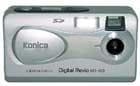
Written on: 29/02/2008
Best not to bother! Good camera for the price - if you transfer pics using card - no good for USB transfer. A nightmare with drivers, conflicts with ALL other USB devices! Leave well alone. (read more)
Written on: 27/08/2006 by Blooby (3 reviews written)
For what was a cheap camera in it's day it was good value for money. It takes good pictures for those who just want to aim and take the pic. The menu on the camera could be a little bit more people friendly and the book could explain things a bit clearer. I've been very happy with it and am only now three and a half years later looking at newer cameras. (read more)
Written on: 14/05/2006 by PhilipBlake (2 reviews written)
Despite the batteries dieing on me, when I actually get a picture from the Konica Revio KD-100 digital camera it is pretty good I guess. Does anyone know where I can buy the AC/DC adapter for the camera? If so, could you please leave me a comment? Thank you. (read more)
Written on: 27/08/2006
You can purchase the AC Adapter at Jessops camera shops.
Written on: 07/10/2005 by YBH1707
SOMEONE PLEASE HELP!
Can anyone help? I cannot get the Konica Revio KD-100 camera driver to install despite having the correct operating system.
Someone suggested downloading it direct from Konica; Guess what? You can't anymore! they have either disowned the product (at least that would show some level of competency) or it is now obsolete.
Is anyone lucky enough to have it installed? If so, do you think you could send it on to me as an email?
I may have more luck doing it that way!
(read more)
Written on: 21/07/2005 by biggles266
I have managed to make a set of Duracell Batteries last a whole week in the Konica Revio KD-100 by using the viewfinder, taking approx 70 pics. I am now investing in a set of rechargeables. I am very pleased with the outdoor picture quality but indoor flash is not always good. I have had my camera refuse to take a picture on more than one occasion and it also froze so I couldn't switch it off. However, I like the quirky nature of the camera and the picture quality is good. (read more)
Written on: 08/05/2005 by martinbennett2 (1 review written)
The useless instruction manual includes mistakes and does not give you much information. If you connect the power adaptor up to the camera the low battery sign comes up. It uses up battery life even when the camera is off! So I always have to remove the batteries when I am not using it and then all my settings go out the window. It is really hard to get used to and I starting wish I had never bought it.
I recommend to people not to buy this camera.
(read more)
Written on: 02/11/2004 by RayOnCamera (1 review written)
The "useless" manual does not say this, but you may have to press the second button from bottom to get the "removeable disk" to appear on Windows Explorer in order to download pix. I sometimes have to do this several times to get it to work. Whether this removeable disk shows as drive "d" or "e" or "f" depends on how many drives you have on your computer. Overall, not a good camera in my opinion. (read more)
Written on: 15/08/2004 by kingvidor
Konica Revio KD-100 - Overall, I thought this camera was a good buy and the picture quality is good. However, for the money there are now better cameras available. The on/off button has a habit of getting switched on while in the case if there is any pressure on it. (read more)
Written on: 03/04/2004 by hedgepig (1 review written)
The Konica Revio KD-100 just will not work as advertised and I therefore feel that all of us should demand redress from Konica.
Here is a copy of the correspondence I got from Konica when my camera was returned to me, allegedly repaired!
Dear Mr Hedger,
I apologise for the delay in my reply I have just returned from holiday.
I am unable to tell you the problem with your original camera as these cameras are automatically replaced if there is a problem. Kd-100 do not come with an SD...
(read more)
Written on: 25/03/2004 by Cynthia (1 review written)
Software supplied with the Konica Revio KD-100 Digital Camera does not have a driver that works with XP. The driver is not signed.No matter how many times you reqest help from Konica UK E-mails 5 remain unanswered.These cameras are only sold in this country Konica USA refer you to UK so no help there either.Photos remain in camera (read more)
Written on: 09/01/2004 by Randy8 (1 review written)
The Batteries on the Konica Revio KD-100 digital camera wont last more than 5-6 minutes, no comercial adapters for this camera, and finally my 5 years son let it drop from no more than 3ft tall(camera still inside the case) and the camera don't work any more, so I asked for assitance in UK (I live in sudamerica) and they say: is more expensive to send it to UK & back than the price of the camera.....!!thats is the only assistance I get from those guys. I waste my 99 pounds. (read more)
Written on: 06/01/2004 by Sqwidmaster (1 review written)
If you want a digital camera then don't buy the Konica Revio KD-100! Bought it 2day (5th Jan 2004) & I haven't been able 2 transfer any pictures (using Windows 2k sp4) & how the heck do u get the webcam 2 work? I've tried 4 about 3-4hrs & finally gave up! Gonna try & take this digital camera back 2 Argos. (read more)
Written on: 14/06/2003 by Flo.
Works perfect under WinXp. It is recognised imediately without any USB driver. Image quality is good. When i plug the USB cable the camera lcd ask the following modes:DISK DRIVE or SILENT VIDEO. Can anyone tell me if REVIO-100 works as a webcam? How? Trough USB cable or Video Out? (read more)
Written on: 09/06/2003 by Callan Cool.
The Konica Digital Revio KD 100 was the first Megapixel Digital camera with an LCD preview screen to retail on the U.K. High Street for under £100 and as a camera has been around for quite a while. Whilst its there's now around half a dozen or more 2 megapixel cameras on sale for the same price as the revio, with Konica recently introducing it's own 2 megapixel DC 25 retailing at only £10 more, is the KD 100 a good buy or not?
Looking around the reviews of this camera on review centre it...
(read more)
Written on: 20/05/2003 by Bluemeanie.
Had some trouble with the Konica Revio KD-100. Software included wont work as I thought it would, but if you go to Windows explorer when it is connected (you may have to press "power" and "mode" once or twice) you will see a new virtual drive held on the camera itself. You can then cut and paste pics and vids straight over. (read more)
Written on: 05/06/2003
Are u joking. I had a revio 100 and was unhappy with it. I now use a jenoptik 2.1 which cost me £10 less than konicas rrp of £100 and the difference in quality at 800x 600 as opposed to the konicas higher resolution of 1280 x1024 is clearly visible. Mail me and ill send u 2 photos to demonstrate.
Written on: 21/11/2004
Thank you for this comment. I had been trying for over 2 hours to extract the photos from the KD 100. I could not get the drivers for the camera to install and this review SAVED ME! I copied and pasted the photos from the camera to my PC. Thanks loads.
<br>By the way, don't buy this camera if you want one that's easy to work with once the pictues have been taken!
Written on: 16/05/2003 by Ian.
Unclear instruction manual, not user friendly, expensive memory format, batteries last minutes, blurry images, a universal mains adapter plug won't fit. If I worked out how to use it as a web cam the batteries wouldn't last five mins. I couldn't honestly recommend it to anyone. (read more)
Written on: 09/05/2003 by John Dunne.
Nothing but problems with this camera. Took it on a night out, from 9 o'clock till 4, went through 6 pairs of batteries.
Now I can't even download my pictures from it.
(read more)
Written on: 27/08/2003
I have the same camera and my battery has lasted a long time, if your using normal alkaline batteries this is the problem. You should try using either Panasonic/Duracell or any other manufacturer battery type CR-V3 which are lithium batteries and will last the pace.
Written on: 28/04/2003 by Danielle16.
I feel that perhaps this model is not very good in that the batteries last less than a minute and this should have been stated in the specification before it was bought (read more)
Written on: 26/06/2003
could u please help me with this camera i cant download the pics from the camera please help its driving me mad
Written on: 26/06/2003
have you tried looking on 'my computer' when its all plugged in cos there should be a new icon called 'e drive' but if not and all the softwares there etc try taking it back cos my one stopped downloading pictures and my new one worked perfectly first time!
Written on: 27/06/2003
thank you i've no e drive in my computer so i think i will take it back
Written on: 21/07/2003
Making sure the usb lead is connected to the computer, open up 'my computer'. Plug the other end of the lead into the camera, and you should get 'disk drive' and 'silent video' displayed on the lcd. Select 'disk drive' using the 'set/disp' on the rear of the camera, and a new icon pops up on 'my computer', called 'removable disk e'. Click to open, and this brings up a folder called 'dcim'. Opening this brings up a new folder, '100image', open this to get your pictures. I copy and paste each picture into a new folder, as they disappear when the camera is unplugged. If anyone has managed to format the Kodak 64mb memory card, let me know, as the users manual is useless! wyevalet@yahoo.co.uk
Written on: 05/01/2004
Les, You can have 5 stars! I had been struggling for HOURS trying to download my pictures (Konica Revio 100) I can't believe how COMPLICATED this system is, and the book supplied is USELESS! Thank you again Les!
Written on: 06/01/2004
It's pretty tricky to start with, but it's not a bad little camera when you get used to it. It's best to use rechargeable batteries too, as it eats ordinary ones!
Written on: 02/11/2004
It is not in the "useless" manual, but you may have to press the button second up from bottom to get the "removeable disk" to show on Windows Explorer. I sometimes have to do this several times. Whether this is shown as drive "d" or "e" depends on how many drives you have on your computer. Agree with comments - not a good camera.
Written on: 28/04/2003 by fenwoman.
I bought this to replace another camera. I needed something cheap yet reliable. I only wish I had read the reviews here before I bought it.
Spent 3 hours trying to download the driver to no avail on Win98.I feel I have wasted money I can little afford to waste.
Folks, avoid this like the plague unless you actually *enjoy* tearing your hair out in frustration.
(read more)
Written on: 06/03/2003 by Alistair.
Konica Revio KD-100 has probably been my worst investment EVER! I have not been able to download one single picture! I only wish that I had come accross this site prior to buying it! I wonder what 'Trading Standards' would have to say about this completely inoperable excuse for a camera??
What a load of mince!
(read more)
Written on: 06/06/2003
For all those that want to know how to download the images I'll tell you, as the manual gets it wrong. It tells you to use my computer, but as for selecting images to drag and drop over my computer is impractical. All you need to do is use windows explorer and use it like you do when you move files from one directoty to another. Anyone needeing help mail me., this makes it a doddle, and it took me 2 seconds to realise whats virtuall impossible in my computer is easy peasy in windows explorer. If you want to mail me ill go into more detail.
Written on: 04/03/2003 by Shifter.
Does anyone know any shops where the adapter can be brought??? (read more)
Written on: 22/09/2003
A mains adaptor can be found at http://cgi.ebay.co.uk/ws/eBayISAPI.dll?ViewItem&item=2952369721&category=15215
<br>until 28th september, the seller is dc-pro-europe
Written on: 12/02/2003 by overpedro.
Hello, I just bought the camera and i have no probs to put my photos on the computer but i really don't know how to use it as a webcam. I installed all drivers but is there another special driver i have to download ?; or does it work as a webcam only with Windows XP?. Any advice? Thanks ;-) (read more)
Written on: 10/03/2003
I have a 128 mb memory card for this camera which gives me about 7 minutes of video footage in total, but I only seem to be able to take 15 second videos at a time - is there any way I can change this?
Written on: 28/03/2003
I am looking for help here. I have lost my operations manual and am having difficulty in downloading pictures from the camera to my PC. I have loaded the software and driver and tried to download a picture in Photosuite but it doesn't seem to recognise the camera.
<br><br>
<br><br>The PC operating system is Windows 2000 Pro. Any ideas???
Written on: 01/02/2004
i have not got a disk for my digital camera it is konica digital revio kd-100 can you hlep me i am on xp pc
Written on: 14/12/2005
It looks like not working as webcam under XP as well, I am seeking drivers over the internet
<br>
<br>It is detected as : "camera" but can"t be fully installed without proper drivers.
<br>
<br>Carry on :)
Written on: 22/01/2003 by mik.
Got it in December loaded driver for win98 easily but found the battery went flat very fast. Began by thinking it was a set of oldish batteries. Eventually found that auto power off would not work at all, also realised that it is very easy to switch on accidently when putting it back in its pouch or while carrying it. The first swap offered would also not auto power off a replacement was sent by the makers but I'd lost confidence in it and took the shops offer of an alternative Fuji camera.... (read more)
Written on: 21/01/2003 by Mark.
Very poor battery life, no power adaptor and can't seem to get hold of them, uses expensive SD memory and has a habbit of turning itself on because the power button sticks out on the back (read more)
Written on: 20/01/2003 by Matzy.
If you are thinking of buying this camera, this is probably going to be your first experience of digital photography and you are going to be pleased with the results. All I can say is that for £99 I dont think u are going to find much better. 1.3 megapixels - LCD Display - FLASH - movie capture - doubles up as a webcam. I did not experience a single difficulty in connecting my camera to my PC either ... always a bonus and something that happens less and less nowadays!!(Win XP... (read more)
Written on: 11/01/2003 by joe g.
At the price good fun will tell you all in months to come, pity it didn't come with ac power adapter "ten a penny these days" or hd battery belt pack and lead used in photog. 30 years or more. (read more)
Written on: 20/01/2003
yep...thats about right...quite a fun thing...good for websites
Written on: 06/06/2003
mine had a similar batterry power indicator problem, open the battery cover with a dead battery and repace it and it shows half charge, also on a number of occasions refused to power up but opening and closing battery cover solved this. my second kept freezing on me
<br>
Written on: 02/01/2003 by Steve.
This camera has compatibility issues with Win 98 SE. Beware (and I have tried everything to try and get it working!) Im going to have to change mine. Damn. (read more)
Written on: 05/01/2003
I bought my wife the same camera, and had the same problem as you with the driver disk, the camera is brillant, but the drivers are lousy, I also have to take the camera back to the shop and buy her a new one.
Written on: 15/02/2003
I bought the same camera, problems with software, changed camera, again problems with software...also use batteries as if there were no tomorrow....now buying a sony instead....(know a person who works in a well know shop and told me, that it is always the software people complain about, never sony or fuji!
Written on: 12/04/2003
I also am having problems with the software. I can't seem to be able to download any of my pictures. Bought the camera in June so no hope of taking it back. As for adaptors I bought one that has changeable power settings and plugs and this works ok.
Written on: 31/12/2002 by Steve.
Semi-pro indeed! That kind of comment is inane and speaks volumes about the quality of the reviewer, rather than this very ordinary camera. The Konica Revio KD-100 digital camera is good value, from a good manufacturer. That's all that can be said. Mine's going back today because it won't take sharp pictures - must be a lens fault. (read more)
Written on: 06/06/2003
wasn't a lens fault
<br>
Written on: 28/12/2002 by Andy.
This is a nice first camera, a lot easier to use than many other models. There are a lot of features for a camera in this price and a good degree of control over pictures without complication. I would recommend though that you dump the Alkali batteries for some decent high power rechargables. I'm not sure about PC software problems, I just plugged it straight into my eMac and instantly it loaded up iPhoto and I was away. I didn't even need to install a driver. However I cannot use it for... (read more)
Written on: 26/07/2003
Review is spot on
Written on: 27/12/2002 by robert.
This is a top camera at a good price, dead easy to use nice and light Well recommended. Only bad point is the software, the best thing you can do is take it out the box and put it in your microwave (with a copy of windows 98)and put on full power for 15 minutes, xp picks the camera up as soon as its plugged in. use that (read more)
Written on: 27/12/2002 by Jay.
I like this digital camera having only had it for a few days and its my first digital one, i would have liked a better one but it was a present from my parents but having no ac adaptor in the kit was a bit annoying as for the removable disk thing when software is loaded double click the my computer icon, it will appear as either Drive e or drive f depending on how many cd/dvd drives u have on your computer if any one can tell me how i can get an ac adaptor email me. (read more)
Written on: 23/01/2003
Hi, did you find out where to get an A.C. mains lead?
Written on: 05/02/2003
If anyone knows where to get an ac-adaptor for this product, please leave a comment here, I've searched and searched and can't find one ...
Written on: 17/02/2003
you can get the a/c adaptor by phoning: partmaster at 00448709090444 it takes about 7 days to get one mailed. This is the only place I have found for the a/c adaptor.
Written on: 18/11/2002 by Chris.
Attempts to load cd-rom software - USB drivers caused my PC to totally crash twice...no response from Konica by e-mail. A review you will have no intention of publishing but I have met one other person to whom the CD software accompanying this camera was an equal disaster to mine. (read more)
Written on: 18/12/2002
The guy before me who said that his computer crashed...well I am having the EXACT same problem and have yet to find a solution,I have just wrote an email to Konica and hopefully I will be more succesful in getting a reply, If anyone else has a solution for the "Konica digital camera Revio KD-100" I would highly appreciate it if you could email me at stoosh2k@hotmail.com Thanks
Written on: 29/12/2002
I also have problems with the driver on Windows98 , have emailed Konica - email Tricia.Dale@tvu.ac.uk
Written on: 22/01/2003
I like you all have not been able to obtain a driver, when getting a new part fitted to my pc, i asked the guy fixing it to try and install a driver but he could not do it either, konica can't help with the problem, if you like the camera, do what i did and buy a card reader and a sd card, you won't have to worry about using the battery power anymore except for taking pictures, use rechargeable too.
Written on: 05/02/2003
My PC gets a Windows fatal exception when I try to download pics from the KD-100. I've tried everything without success. The Konica website seems to have drivers to download for all the other models except this one. Good job it was bought at Argos. At least I have a chance of getting a refund. Big thumbs down for this camera not because of it's picture quality but because of its lousy software.
Written on: 06/02/2003
I wrote a review about this camera a few weeks ago saying that I could not get it to install. Did not get the problem sorted. Konica totally ignored my emails so I took the camera back to the shop and bought a different one altogether. I have received a lot of emails from people saying they were having problems so I contacted watchdog and told them all about konica and there lack of care about this matter. Good luck to everyone else who still has this camera. I am sure it really is a good one...if we could get it into the computer!!! stuart
Written on: 13/02/2003
Several reviews have criticised the software shipped with the Konica Revio KD-100 Digital Camera as causeing their computers to crash. Indeed it does, but it is on computers which already have a suitable, in-built Windows driver. The driver supplied on disk is generally only required for Windows 98 and 98SE. No "additional" driver is required with Windows operating systems after 98SE since the USB driver supplied within the Windows 2000,ME,XP operating system suffices. I received this helpful advice from Konica (cservice@konicaphoto.co.uk) which solves the problem. It might have been helpful if this had been clearly explained in the literature which accompanies the camera.
Written on: 14/02/2003
An update on my comment of 5th Feb. I persevered with this software. To be fair to Konica support they were very helpful and responded quickly by email. The first response suggestion just caused Windows to crash with a fatal error but having passed the information back to Konica they sent me a patch for another software package on my PC which was causing some sort of conflict. I am pleased to say this cured the problem and I now get the Removable Disc icon in My Computer. I still think Konica need to look carefully at the quality of the software they are supplying with the camera. There must be a lot of confused and frustrated users out there.
Written on: 19/02/2003
Hello, i'm a french user. I received my camera yesterday and installed the software. Everything went well (i can read photographs i took using virtual drive) until i reboot. Then PC Crashes. Nothing to do to restore a normal functionality. I Had to reinstall everything on my pc, but now even if i install camera software i cannot see virtual drive anymore. Has somebody a solution to make it work without installing W2K or XP and keeping my W98SE !
Written on: 16/11/2002 by Naija.
Have installed the software of the Konica Revio KD100 twice, computer doesn't recognise the camera despite being connected via USB. (read more)
Written on: 23/12/2002
Exact same problem, using win98SE, driver installation shows no errors, just will not show the camera!!
Written on: 06/01/2003
Having the exact same problem using w2k the pc just won't see the camera to download pictures, tearing my hair out stage
Written on: 11/01/2003
I also am having trouble getting my PC to recognise the KD100. My manager loaned me a 32bit Plug and play USB Two Ports Card - and this eventually worked. I will probably have to go out and buy one now - this in spite of having Windows ME installed. So much for just plug into USB and go!
Written on: 21/02/2003
The drivers supplied as the CD software for this camera work with almost nothing certainly not W98 as it says on the box..it will totally crash a computer working on W98.The drivers will not load.
People with 98SE ,ME and 2000 also have problems of one sort or another.
The only solution seems to be to go out and buy an SD card reader(USB) and this will also save you batteries.
It is a bad deal the Konica KD100 - don't buy one.
Assistance from Konica is non-existent - they will not reply to any e-mails.
This camera is rubbish that proves there is no such thing as decent digital photography on the cheap.
Written on: 07/09/2002 by Rhys Williams.
I have only used this Konica Revio KD-100 digital camera for a day but already I am well impressed with the quality.
On the 640x480 mode I can get 30 pics out of it.
It was a bonus to find that it can be used as a web cam (although a power supply is needed for this) and also it is capable of doing short movies.
I would recommend this camera to anyone.
(read more)
Written on: 11/09/2002
Recent purchase. Manual states page 29-Downloading pictures-item 4 "find the removeable disk". Can anyone clarify as I can't get on computer. Past reviews very useful.
Written on: 16/09/2002
Good review though I wish I had read them before I bought the camera. I am also having problems getting my camera and computer to work together. The disc enclosed with the package has not been verified with Windows XP and doesn't appear to do anything more than give me MGI PhotoSuite and PhotoVista.
Written on: 04/10/2002
If you have installed the driver and your pc is not showing a removable drive, plug the camera into the usb (switching on before connection)
<br>go into Control Panel and run: 'Find New Hardware'.
<br>this will go through to the end and say:
<br>'No New Hardware Found'.
<br>Close it down and immediately the Usb will be scanned and your new removeable drive will appear!
Written on: 07/10/2002
Got this camera today and have to say that the quality of both the camera and pics is outstanding for the price. As mentioned above the battery life is short if you're using normal batteries but investment in a charger and some ni-mih batteries (either 1300 or 1700mah) would be a must if you wish to use this camera properly.
<br>
<br>this model comes highly recomended so if you're after purchasing a cheap digi cam then please give this model serious thought as it's a bargain.
Written on: 27/12/2002
Brilliant advise about how to get removeable drive onto PC. Thanks a lot would never have managed without it.
Written on: 02/01/2003
If wishing to connect the KD-100z to a p.c you should select the "DISK DRIVE" option on the rear of the camera and press the "SET/DISP" button to confirm this selection. Then you will find a new removable drive in the "MY COMPUTER" section of your p.c. This new drive is the cameras memory which you can double click on to access. Your files will be contained within the folders on this drive...
Written on: 31/08/2002 by Shaolyen.
Although Konica are a well known brand, they still have a long way to go before they can compare with the likes of Olympus and Kodak. The KD-100 digital camera is their entry level offering, and while the price is good at £99 there are many things you need to consider before buying this camera.
The first thing to mention is the picture quality. Although essentially this is a £99 camera, the standard of pictures it produces is far short of professional quality. On solid blocks of colour...
(read more)
Written on: 14/09/2002
Any advice welcome on how to operate the 2xzoom on the konica revio kd100
Written on: 29/10/2002
What about the supplied software.Trying to download the drivers from the supplied CDROM completely corrupted Windows 98 on my PC necessitating a rebuild (twice!!!).
What USB version does this camera operate on and is it compatible to Windows 98 operating USB 1.1?
I think not.
In effect the camera is poorly described as to its characteristics .
Written on: 17/12/2002
The guy who is complaining about the drivers messing up his Win 98 should look at his own setup as I`m running 98 and have had no problems at all. I think it`s a brilliant little camera for the money.
Written on: 20/01/2003
I have windows 98 se....and no probs....once you figure out it works as a removable drive and you don't need to boot to plug it in and make it work. I have a feeling the conflicts/problems are more to do with the mobos compatibility with usb and the os..certainly no probs here.
Written on: 30/01/2003
Hello,
I just bought the camera and i can't download the images to my computer. I installed the drivers without problems but after that when i try to "get" them from the camera i can't do anything.
Any advice?
Cheers
Written on: 31/01/2003
Just switch on the computer with the supplied silver usb plugged into the back. Don't plug the camera in yet. When boot up is complete, plug the camera into the miniusb connection on the silver lead. The camera screen should light up (if not hit the camera power button) giving two options...choose removable disk drive (the top option - not the webcam option) by using the arrow button to select then press the enter/select key on the camera (2nd from the bottom on the cameras back...from memory). Now double click on my computer...the camera should be visible as an extra "removable" hard drive. Go into this by double clicking and copy the files you find in the folders there onto your desktop....and voila.
You may want a photoeditor. There are loads of free ones available. I use corel printhouse magic. Best adivice...go buy a pc magazine with a free photoeditor on the coverdisk.
<br>
<br>Good Luck.
Written on: 05/02/2003
I've just bought one of these. The camera works but the software doesn't. I followed the instructions as suggested by the previous commenter but as soon as I press enter/select after connecting the camera I just get a fatal exception in Windows. That's not much good is it. This is really infuriating. Anyone got any good ideas?
Written on: 12/02/2003
Hello, I just bought the camera and i have no probs to put my photos on the compputer but i really don't know how to use it as a webcam. I installed all drivers but is there another special driver i have to download ?; or does it work as a webcam only with Windows XP?.Any advice? Thanks
;-)
Written on: 25/02/2003
The web cam does work OK in Windows 98SE. I cannot comment on your problem as it worked first time - sorry. However, I cannot get the disk icon in 'my computer' for accessing photos. I have tried every combination of starting up and reloading the drivers - any ideas?
Written on: 27/02/2003
Dave, You may have read my comments left on 5th Feb. I had exactly the same trouble. The Konica support people responded quickly to my email. Their first suggestion, however, just caused a fatal exception in Windows every time I connected to the camera. They then sent me a patch for some other software on my PC which was causing a conflict. I rather warily applied the patch and I'm pleased to say it cured the problem. I now get the removable disc icon and everything works fine.
Written on: 10/06/2003
to geoff, to operate digital zoom, either the third or fourth button down will have 2x next to it, press it to operate, with or without the screen on, though its not a good zoom.
Written on: 29/08/2002 by Weekend Warrior.
I liked this Konica Revio KD-100 digital camera from the outset for its specification, style and price. It's small, easy to use, looks good and takes great photos. However, mine has broken already (will not turn on - no the batteries aren't dead!) and when it did work, it used batteries really fast. Approximately 25-30 pics with flash from a set of Duracells (to see example photos click on the recommended website link)
Ultimately, I am taking this camera back for a replacement which has...
(read more)
Written on: 31/08/2002
Big mistake - NEVER use Duracells or any other non-rechargeable battery type in a digital camera.
<br>
<br>Using 1800mAh NiMH recharageables will give you 3-4 times the amount of pictures.
Written on: 03/09/2002
Took the camera back I was so disgusted with it and the shop where I bought it gave me the same advice about 1800mAh rechargeables. So having bought some, the battery life is much better, but the jury is still out on the reliability and durability aspects.
Written on: 25/09/2002
I had the same problem with my camera braking the 1st night we got it!
<br>we had full batteries in and the battery display wouldnt recognise them as full batteries, and wouldnt turn on, or would switch off in 5 secs.
<br>Have taken the camera back (perhaps a design fault?) and have a new shiny replacement. Didnt know about about the battery type advice though.
<br>cheers
<br>Lu
Written on: 26/08/2002 by MD.
Very pleased with this Konica Revio KD-100 digital camera and for under 100 pounds it's ideal semi-pro entry level..... (read more)
Written on: 18/12/2002
Semi-pro? This camera barely makes the grade for any kind of purpose.
Do you work for Konica?
Written on: 19/08/2002 by XsCode.
I bought this Konica Revio KD-100 digital camera today and within 30 minutes I was fully conversant with it's features. It's small and neat and excellent value for the price (£99 from Argos) (read more)
Written on: 31/07/2002 by Lightman.
Got this Konica RevioKD-100 digital camera after swapping it for a Kodak DC3215. For a £99 camera this is a bargain, and with practice you can take some great shots. It has a slim design and a nice case to go with it, as well as a good manual. A clear backlit screen is placed at the rear of the camera with a clear menu system. You can view your pictures as a slide show or have them all shown as thumbnails on the screen. There is a clear LCD panel at the top of the camera, which shows all the... (read more)
Written on: 04/12/2002
I bought the Konica KD-100, my mate will be gutted when I tell Him, He bought his for around 300 pounds, and the konica does everything his can, and the quality seems to be the same.
As rated by real users
"Top Quality" Read More
"Beautiful Little camera " Read More
"Affordable professional" Read More
"RzZyVUBumD" Read More
"Awesome !!" Read More
254623_Kenbjme's Response to PhilipBlake's Review
Written on: 09/08/2006
Sir, can you please send me the manual of this Konica Revio KD-100. I actually look for the manual even in konica website, but it seems they have no manual for the Konica Revio KD-100. My brother gave me this one and there's no manual, just need the manual badly so i can use it. If you have the manual, can you please send it and attach it to an email at kenbjme@yahoo.com. It will be very much appreciated.I rate this one a 5 out of 10. Good cam but i need the manual. Thanks again