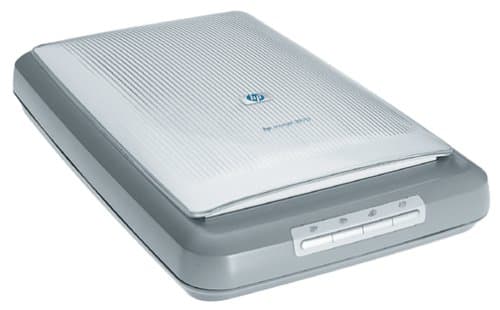
HP Scanjet 3970
Ease of Set Up
Ease of Use
Scan Quality
HP Scanjet 3970
When you purchase through links on our site, we may earn an affiliate commission. Here's how it works.
User Reviews
Value For Money
Scan Quality
Ease of Set Up
Ease of Use
I Have A Hp Scanjet Plus With Interface Card. But
I have a HP ScanJet Plus with interface card. But it does not work.
You need to install a driver to support the interface card. The last known official sites for the driver are unreachable (rvs.ctrl-c.liu.se) or out of date (sunsite.unc.edu).
Here are the sources and READMEs of the driver for various Linux kernels:
Linux kernel 2.0 and 2.1.103:
Download hpscan.tar.gz
Linux kernel 2.2.7:
Download hpscan-2.2.7.tar.gz (thanks to Kipp Cannon for his research).
Linux kernel 2.4.x:
Download hpscan-2.2.7.tar.gz (driver for kernel 2.2.7) and hpscan-2.2.7.patch.tar.gz (patch for support of kernel 2.4.x. Thanks to Kipp Cannon for his work).
Untar the hpscan-2.2.7.patch.tar.gz and follow the instructions in README.patch
This driver gives you a new device /dev/hpscan. Then you need to add to the file /usr/local/etc/sane.d/hp.conf the two lines
/dev/hpscan
option connect-device
You need at least SANE v1.01 to do that.
I want to buy a PhotoSmart S20. Is it supported ?
It is not supported by the hp-backend. It seems that it does not use SCL (HP's Scanner Control Language) which is required for use with the hp-backend.
I have a HP ScanJet 7xxx C. Is it supported ?
Yes. But not by the hp-backend. Use the avision-backend.
I have a scanner HP xyz. Is it supported ?
Here is a list of all the scanners that are supported by the hp-backend:
Model HP Model Number Interface
ScanJet Plus 9195A HP Parallel Interface Card
ScanJet IIc 1750A SCSI
ScanJet IIcx 2500A SCSI
ScanJet IIp 1790A SCSI
ScanJet 3C 2520A SCSI
ScanJet 3P 2570A SCSI
ScanJet 4C 2520A SCSI
ScanJet 4P 1130A SCSI
ScanJet 4100C 6290A USB
ScanJet 5P 5110A SCSI
ScanJet 5100C 5190A parallel port
ScanJet 5200C 7190A parallel port/USB
ScanJet 6100C 2520A SCSI
ScanJet 6200C 6270A SCSI/USB
ScanJet 6250C 6270A SCSI/USB
ScanJet 6300C 7670A SCSI/USB
ScanJet 6350C 7670A SCSI/USB
ScanJet 6390C 7670A SCSI/USB
PhotoSmart PhotoScanner 5100A SCSI
For the HP parallel interface card (ScanJet Plus) and parallel port interface additional kernel drivers may be required.
Note: Because Hewlett-Packard does no longer produce scanners which support SCL (beside MFP's), this list is complete. Other HP-scanners are not supported by the hp-backend. But you can find support for other HP-scanners on
SANE supported devices . This should be the first place to check.
Linux Parallel Port Sharing and ppSCSI suite of drivers. Here you could find support for scanners connected to the parallel port. A patch of this driver suite for 2.4-kernels can be found at Debian.
If your parallel port HP scanner is not listed here, it is quite certain that it is not supported.
David Paschal's support for Multi-Function Peripherals (MFP's) . Here you can find support for combined printer/scanner devices like HP OfficeJets.
Value For Money
Scan Quality
Ease of Set Up
Ease of Use
When The Hp Scanjet 3970 Is Working It Does The Jo
When the HP Scanjet 3970 is working it does the job well. The imaging software was also good, but I'm not happy with the reliabillity of this product.
Value For Money
Took Just A Few Minutes To Install Software For Th
Took just a few minutes to install software for the HP Scanjet 3970 and get the scanner up and running. Scanner looks stylish has a quality feel and is very easy to use with buttons on the front which launch the key functions. Scan, Print,Share to web, and create memories CD. It is USB 2.0 and will scan documents,photos, 35mm slides (one at a time), and negatives.
Q&A
Whether HP scanjet 3970 can scan other document?
I wish to take the HP Scanjet 3970 from my office home. Over the years I lost the installation disc and thus the scanjet does not work at home. How to get the missing driver?
Thank you.